Managing Members
The members page: who sees it, searching and paging, changing a member's role, removing a member, who may act on whom, the at-least-one-owner guard, member policies and logs.
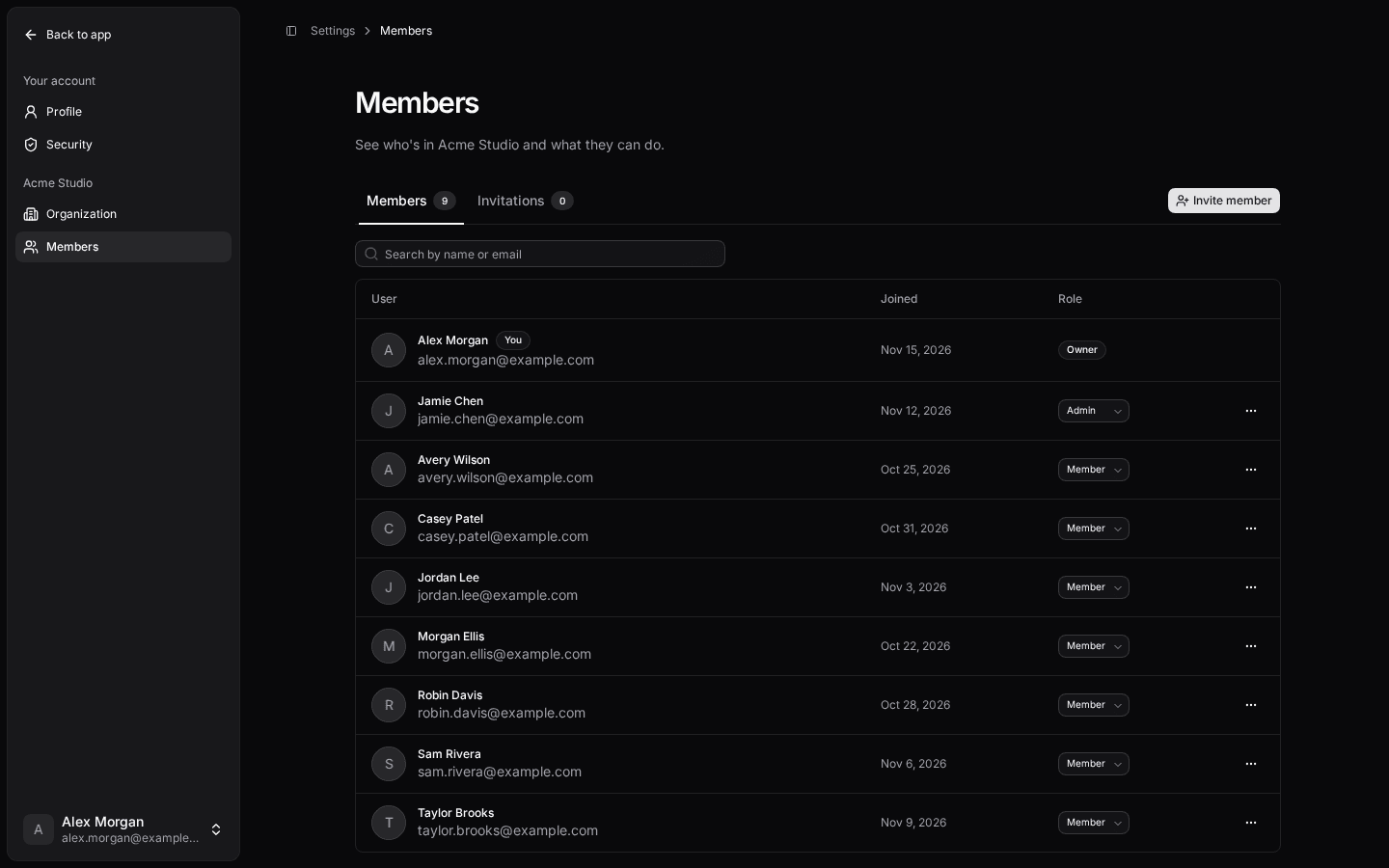
Settings → Members lists the active organization's members. Every member sees the list; owners and admins also change roles and remove members there, and whoever can invite gets the Invitations tab (Inviting Members).
Everything goes through the members service in @kit/organizations (packages/organizations/src/members.ts), called from one page: apps/web/pages/(app)/settings/members.server.ts (the loader, and the changeRole and remove actions). The UI is MembersList from @kit/organizations/ui.
The List
- Who sees it: any member of the active organization. Without one, the page is a 404. Names, emails, pictures and roles are only ever shown to members of the same organization.
- Order: by role (highest first; a role your config no longer has comes last, with an Unknown role badge), then by name.
- Search: by name or email, case-insensitive, as you type. The search and the page stay in the URL (
?q=…&page=2), so a reload or a shared link shows the same list.%and_match themselves. - Pages: 25 members per page with previous and next. The tab's count is everyone, whatever the search.
 Click to expand
Acme Studio members with owner, admin and member roles in dark mode.
Changing a Role
Where you may change a member's role, the Role cell is a select of the roles you may give them; picking one saves it. Making someone an owner asks first: owners can do everything, including deleting the organization and removing other owners. Elsewhere the role is a read-only badge.
Removing a Member
Where you may remove a member, their row has a … menu with Remove, behind a confirmation naming them and the organization. Their next request no longer has the organization: they land in their personal context; in organizations-only mode, in their next organization, or onboarding if they have none. The invitations they sent that are still pending are canceled with them, so links they handed out stop working; their account stays, and you can invite the person again later. Leaving the organization does the same for your own pending invitations.
Who May Act on Whom
One rule decides what the page offers and what the server accepts: memberActionsFor({ actorRoles, isSelf, targetRoles }) from @kit/organizations. The server runs the same rule, so a hand-crafted request gets a 403.
- Nobody acts on themselves. Leaving the organization (organization settings) is the only way out of your own seat.
- Owners act on every other member, other owners and members with an unknown role included, and give any configured role.
- Every other role acts only on members whose roles are all strictly below one of theirs, and gives only roles strictly below one of theirs (the same rule as inviting,
getGrantableRoles). With the default roles, an admin removes members but has no role to change them to, and can't touch other admins or owners. - Unknown roles: only owners may change or remove a member whose role your config no longer has.
- Permissions: changing a role needs
member:update, removing needsmember:delete. Owners need them too; the default owner role has both. Change them inpackages/rbac/src/rbac.config.ts(Roles and Permissions). - The new role must be exactly one configured role; anything else is a field error.
When a role or permission changes while the page is open, the next action is refused (403) and the page refreshes to what you may do now. A member removed by someone else meanwhile answers "This person is no longer a member".
At Least One Owner
An organization always keeps at least one owner. Postgres enforces it, so no code path can get around it: removing, demoting or moving the last owner fails, also when two owners act at the same moment, and the page shows "The organization needs at least one owner." How it works, and what renaming the owner role takes: Roles and Permissions.
Your Own Rules (Member Policies)
For business rules (keep the billing contact, at most three admins), register a member policy in apps/web/config/member-policies.config.server.ts with defineMemberPolicy from @kit/organizations/server. It runs before a role change or a removal, after the kit's own checks; a denial shows your message and changes nothing. Leaving runs no policy. Details and an example: Member Policies.
Logs
Every role change and removal logs one structured entry: member.role_changed, member.role_unchanged (their current role picked), member.removed (with canceledInvitations, how many of their pending invitations were canceled; leaving logs member.left with the same count), or member.refused with its code (a policy's denial also carries the policy's id and code). Each entry has the operation, the acting user and the active organization; once checked, the member's id, their old role and (for a configured role) the new one. Never a name or an address. An unexpected error that isn't a database error is logged with its message and stack. See Logging.
What to Edit
| To change | Edit | Owner |
|---|---|---|
| Roles, levels and permissions | packages/rbac/src/rbac.config.ts | You |
| Business rules before a role change or removal | apps/web/config/member-policies.config.server.ts | You |
| Page layout | apps/web/pages/(app)/settings/members.tsx | You |
| Table, select, menu and dialog | packages/organizations/src/ui/ | Kit: compose your own from the exports instead of editing |
| Copy | kit namespace members (packages/i18n/src/messages/<locale>/members.json) | Kit |
| Who may act on whom | packages/organizations/src/member-rules.ts | Kit: change roles and permissions instead |
Never call auth.api.updateMemberRole or auth.api.removeMember yourself: Better Auth has no role hierarchy below the owner, so it would let an admin act on another admin. Go through organizationsFor(c).members.changeRole / .remove.