To let customers connect Claude, Cursor or ChatGPT to your SaaS without issuing API keys, build a remote MCP server that authenticates with OAuth 2.1. Supabase Auth acts as the authorization server, your Next.js app hosts the consent screen and the MCP endpoint, and Row Level Security decides which rows each agent can read or write.
What is a remote MCP server? A remote MCP server is an HTTP endpoint that exposes your application's data and actions to AI agents, acting as an OAuth 2.1 resource server. Agents authenticate as one of your existing users, request an access token through a consent flow you control, and call tools over the Model Context Protocol. Use one when you want AI agents to work on customer data without distributing credentials.
Most MCP tutorials build a local server: a process on the developer's machine, launched by the client, authenticated with an API key pasted into a config file. That is fine for personal tooling. It fails for a SaaS, because there is no per-user attribution, no consent, no revocation, and the key outlives the employee who created it.
This guide builds the remote kind. The hardest part is tenancy: the access token does not say which workspace the agent may use, so your app has to store and enforce that decision. Everything below was tested against a running implementation on Next.js 16 and Supabase CLI 2.113.0 in August 2026, including seven gotchas where Supabase's behaviour is undocumented or differs from its documentation.
Who plays which role
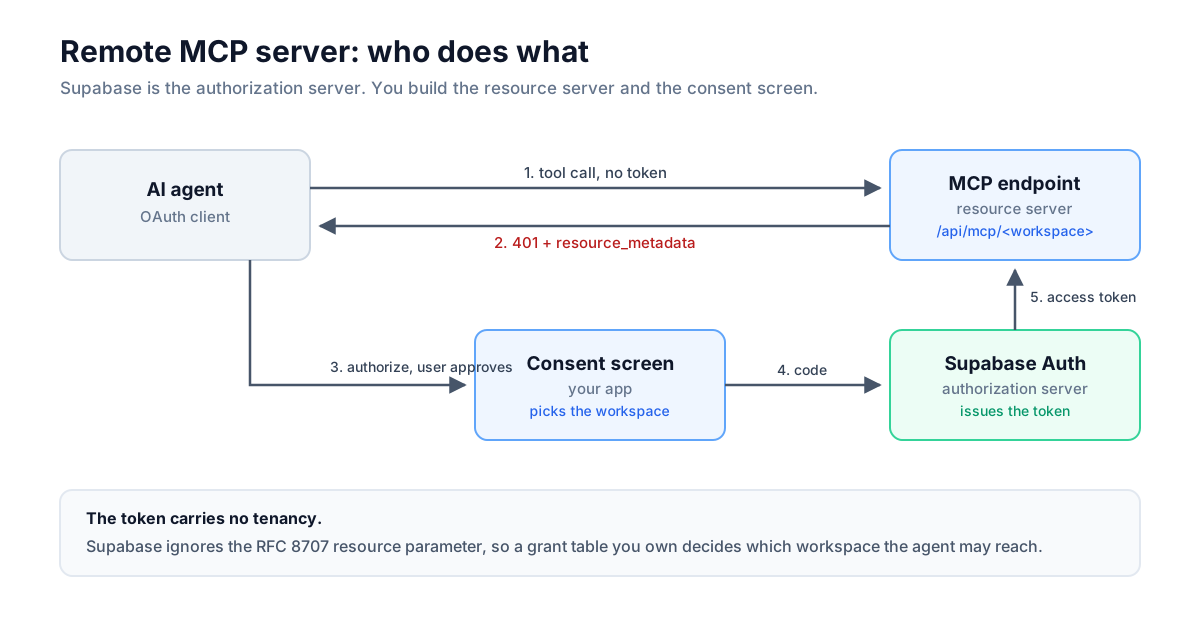
Supabase does not give you an MCP server. It provides the authorization server, and you build the resource server (the MCP endpoint) and the consent screen.
| Role | Who |
|---|---|
| Authorization server | Supabase Auth (/auth/v1/oauth/*) |
| Consent screen | You, a page in your app |
| Resource server (the MCP endpoint) | You, a route handler |
| OAuth client | The AI agent (Claude, Cursor, ChatGPT) |
Supabase's documentation says the same: it does not provide MCP server functionality, and its OAuth 2.1 server exists so agents can authenticate as your existing users.
 Click to expand
In order: the agent calls your MCP endpoint with no token and gets a 401 carrying a resource_metadata pointer. It fetches that metadata, learns Supabase Auth is the authorization server, and sends the user through your consent screen, where they choose which workspace the agent may act on. Supabase issues the token, the agent retries, and Row Level Security decides what it can actually see.
What you need to build an MCP server
- A Supabase project with the OAuth 2.1 server available
- A Next.js App Router application, ideally multi-tenant
- Supabase CLI with support for the
[auth.oauth_server]config block, tested on 2.113 @supabase/auth-jswith theauth.oauthnamespace, tested on 2.112.3
Step 1: Turn Supabase into an OAuth authorization server
Enabling the OAuth server takes one config block and a restart. Add this to supabase/config.toml:
[auth.oauth_server]enabled = trueauthorization_url_path = "/oauth/consent"allow_dynamic_registration = falseThen run supabase stop && supabase start. The authorization_url_path is appended to your Site URL to build the consent screen URL Supabase redirects users to. That page lives in your app, not in Supabase.
Migrate to asymmetric JWT signing (RS256 or ES256) before going further. The documented reason is that third parties can verify tokens using your public JWKS without you sharing a secret. The reason that matters more for an MCP server: on ES256, getClaims() verifies the signature in-process, which we confirmed on our own project. Symmetric HS256 keys cannot be published, so verification has to go back to the auth server. For an endpoint taking one token per tool call, that is the difference between a local check and a network hop. We did not benchmark an HS256 project, so treat the size of the gap as unmeasured.
Verify the server is live:
curl -s http://127.0.0.1:54321/auth/v1/.well-known/oauth-authorization-serverStep 2: Register an OAuth client
Register OAuth clients through the admin API with the client_name field, not name. The Supabase getting-started guide shows name, which the API ignores without an error. A client registered that way has no name, and your consent screen renders "Authorize" followed by a blank.
curl -X POST 'http://127.0.0.1:54321/auth/v1/admin/oauth/clients' \ -H "apikey: $SERVICE_ROLE_KEY" \ -H "Authorization: Bearer $SERVICE_ROLE_KEY" \ -H "Content-Type: application/json" \ -d '{ "client_name": "Acme AI Assistant", "client_uri": "https://example.com", "redirect_uris": ["https://yourapp.com/auth/callback"], "client_type": "public", "token_endpoint_auth_method": "none" }'Two more registration details. Send the secret key in the apikey header: a new-style sb_secret_... key sent only as Authorization: Bearer returns 401 no_authorization, because GoTrue reads new-style keys from apikey. The legacy service role JWT works in either header, and setting both, as above, works with either key format. And redirect URIs are exact matches with no wildcard support, unlike the general redirect allow-list.
Step 3: Build the consent screen
Your consent screen is where the user decides what the agent may reach, and in a multi-tenant app that means more than a yes or no. Supabase redirects to it with an authorization_id, which you exchange for the request details.
const { data: details, error } = await client.auth.oauth.getAuthorizationDetails(authorizationId);// Two response shapes. When the user has already approved this client,// Supabase returns a redirect instead of an authorization to consent to.if (!('authorization_id' in details)) { redirect(details.redirect_url);}Every returning user takes this branch, so your consent screen only renders on the first authorization. The gotchas section below covers what that means for workspace selection.
The user then approves or denies, and you hand the decision back:
const { data } = await client.auth.oauth.approveAuthorization(authorizationId, { skipBrowserRedirect: true,});return NextResponse.redirect(data.redirect_url, 303);Use a 303 rather than the default 307. The form posts, and a 307 would replay the POST against the OAuth client's callback.
One routing detail specific to localized apps: the generic auth gate in Makerkit builds its sign-in redirect from the pathname alone, which drops the query string. Send an unauthenticated user through sign-in and they land back on a consent screen with no authorization_id and nothing to consent to. The consent route needs its own middleware entry that carries search through the round trip.
Step 4: Serve protected resource metadata
MCP servers must implement RFC 9728 Protected Resource Metadata, and the URL is built by path insertion rather than by appending a query. For a resource at https://app.com/api/mcp/acme, the metadata lives at https://app.com/.well-known/oauth-protected-resource/api/mcp/acme.
That shape calls for an optional catch-all route at app/.well-known/oauth-protected-resource/[[...path]]/route.ts:
export async function GET( _request: Request, context: { params: Promise<{ path?: string[] }> },) { const { path = [] } = await context.params; const account = matchMcpResource(path); if (account === undefined) { return new Response('Not Found', { status: 404 }); } return Response.json({ resource: getMcpResourceUri(account), authorization_servers: [getAuthorizationServerIssuer()], scopes_supported: ['openid', 'email', 'profile'], bearer_methods_supported: ['header'], });}Return 404 for anything that is not one of your resources, otherwise the endpoint will advertise resources that do not exist. Leave offline_access out of scopes_supported even though Supabase advertises it, because the MCP specification tells resource servers not to list it.
If your app is localized, exclude .well-known from your middleware matcher. The route sits outside the [locale] segment, and next-intl resolves the path into the localized tree, so the handler is never reached. The symptom is a flat 404 rather than the locale redirect you might expect.
'/((?!_next/static|_next/image|images|api/*|\\.well-known/*).*)'Step 5: Validate the token without audience binding
Token validation is the main job of an MCP resource server, and the MCP specification asks for something Supabase cannot currently express. The spec says a resource server must only accept tokens issued specifically for it, using RFC 8707 resource indicators for audience binding.
Supabase ignores the resource parameter. It accepts it without error and mints the same token regardless, and every token carries aud: "authenticated". That value is shared by every token the project issues, so audience alone proves nothing.
Here is a real decoded access token from the flow:
{ "iss": "http://127.0.0.1:54321/auth/v1", "sub": "31a03e74-1639-45b6-bfa7-77447f1a4762", "aud": "authenticated", "aal": "aal1", "amr": [{ "method": "oauth_provider/authorization_code" }], "client_id": "4805c0a6-8eb7-417f-a9cc-f8320279c7fe", "scope": "openid email profile"}The client_id claim is the useful one. Only the OAuth server mints it, and it survives token refresh. Three checks stand in for the audience binding the spec wants:
- Verify the signature and expiry against the project's JWKS
- Pin the issuer, because a token from a different Supabase project verifies fine against that project's keys
- Require
client_id, which rejects first-party session tokens
The third check is the one most often left out, and it is the defence against a confused deputy attack. A plain user session JWT is signed by the same project, has a valid issuer and subject, and is not expired. Every check the specification names for token validation passes. It is rejected only because it carries no client_id. Without that check, anything holding a user's cookie session could call your MCP endpoint with no consent and no grant.
const client = getSupabaseBearerClient(token);const { data, error } = await client.auth.getClaims(token);if (error ?? !data?.claims) { return unauthorized({ account, description: 'Invalid or expired token.' });}if (data.claims.iss !== getAuthorizationServerIssuer()) { return unauthorized({ account, description: 'Wrong issuer.' });}const clientId = data.claims.client_id;if (typeof clientId !== 'string' || !clientId) { return unauthorized({ account, description: 'Not an OAuth client token.' });}Failures must carry a WWW-Authenticate challenge. Without it the client gets a bare 401 and cannot discover where to authorize:
WWW-Authenticate: Bearer resource_metadata="https://app.com/.well-known/oauth-protected-resource/api/mcp/acme", scope="openid email profile"Step 6: Scope each token to one workspace with a grant table
OAuth scopes cannot express which workspace an agent may act on, so tenancy needs its own model. Supabase supports four user-facing scopes, openid, email, profile and phone, plus offline_access for refresh tokens. Its documentation is explicit that these control ID token claims rather than table access, and custom scopes are not supported.
OAuth authenticates a user, but SaaS data belongs to an account, and a user typically belongs to several. If you have not settled that model yet, start with multi-tenant SaaS architecture.
There are three ways to pick the workspace, and only the third is safe:
- A tool argument (
account_slugon every tool). Zero infrastructure, but the token can then reach every account the user belongs to. You end up with less scoping than an API key while claiming OAuth is safer. - A per-account URL alone (
/api/mcp/acme). The right URL shape, but not enforceable on its own: since Supabase ignoresresource, the token minted for one workspace is byte-identical to the token for another. Replaying it works. - A per-account URL enforced by your own grant table. The URL identifies the tenant, and a table you own decides whether that pairing is allowed.
Take the third. Store the workspace selection at consent time:
create table if not exists public.mcp_client_grants ( id uuid primary key default extensions.uuid_generate_v4(), user_id uuid not null references auth.users (id) on delete cascade, client_id uuid not null, account_id uuid not null references public.accounts (id) on delete cascade, created_at timestamptz not null default now(), unique (user_id, client_id, account_id));The RLS policies matter as much as the table. Every policy requires client_id to be absent from the JWT, so an agent holding a valid token cannot read which workspaces it was granted, cannot widen its own grant, and cannot revoke another client's:
create policy "mcp_client_grants_insert" on public.mcp_client_grants for insert to authenticated with check ( user_id = (select auth.uid()) and (auth.jwt() ->> 'client_id') is null and ( account_id = (select auth.uid()) or public.has_role_on_account(account_id) ) );The last clause prevents a tampered consent form from inserting a grant for an account the user has no role on. Grant no UPDATE to anyone, so a grant can be created or revoked but never re-parented.
Because the policies deliberately hide this table from agents, your server reads it with an admin client, which means the three filters below are the only thing enforcing the grant:
const { data } = await admin .from('mcp_client_grants') .select('id') .eq('user_id', userId) .eq('client_id', clientId) .eq('account_id', accountId) .maybeSingle();One naming detail: personal accounts have no slug, enforced by a database constraint, so the URL needs a reserved segment. We use /api/mcp/me.
Step 7: Connect the MCP transport and register tools
The MCP TypeScript SDK includes a Web Standards transport, so the Next.js route handler stays short. @modelcontextprotocol/sdk 1.30 exports WebStandardStreamableHTTPServerTransport, whose handleRequest(Request) returns a Response. You do not need to write a Node request/response shim, which is the main thing third-party adapters such as mcp-handler provide.
async function handle( request: Request, context: { params: Promise<{ account: string }> },) { const { account } = await context.params; const auth = await authenticateMcpRequest(request, account); if (!auth.ok) { return auth.response; } const server = createMcpServer(auth.context); const transport = new WebStandardStreamableHTTPServerTransport({ sessionIdGenerator: undefined, // stateless enableJsonResponse: true, }); await server.connect(transport); try { return await transport.handleRequest(request); } finally { await transport.close(); await server.close(); }}export const POST = handle;export const GET = handle;export const DELETE = handle;Stateless is the right default on serverless, where consecutive requests may land on different instances. It also removes the need for the Redis-backed session store that higher-level adapters exist to provide. Build a new server per request. Tools close over the caller's RLS-scoped client, and a shared instance could hand one agent's client to another agent's tool call.
Tools query through the agent's own client, so RLS applies exactly as it does in the browser:
server.registerTool( 'create_task', { title: 'Create task', description: 'Creates a task in the current workspace.', inputSchema: { title: z.string().min(1).max(500).describe('Short summary of the task.'), description: z.string().max(5000).optional(), }, }, async ({ title, description }) => { const { data, error } = await context.client .from('tasks') // account_id comes from the grant, never from the model .insert({ account_id: context.accountId, title, description }) .select('id, title, done') .single(); if (error) { return toolError(`Could not create the task: ${error.message}`); } return toolJson(data); },);Three rules for writing tools:
account_idis never a tool argument. It comes from the verified grant, so an agent cannot reach another workspace by passing a different id and the model cannot get it wrong.- Import schemas from
zod/v3. The SDK is built against Zod 3. If your app runs Zod 4, passing a v4 schema fails at registration with an unhelpful error. - Return
isErrorin-band rather than throwing. A thrown error becomes a JSON-RPC protocol error, which the agent reads as "the server broke" rather than "that operation did not work".
Testing the workspace boundary
To check that the grant table works, call a workspace URL the agent has not been granted, add a grant row, and call it again with the same token:
POST /api/mcp/makerkit → 403 access_deniedThe user owns that workspace and RLS would return its data, but the agent is refused because the user granted it only their personal account.
insert into public.mcp_client_grants (user_id, client_id, account_id)values ('31a03e74-…', '4805c0a6-…', '5deaa894-…');POST /api/mcp/makerkit → 200, returns the workspaceThe token did not change and the agent did not re-authorize. Adding one row changed what the agent could reach. The grant table is a least-privilege layer on top of RLS: RLS limits the user, and the grant limits what the user delegated to this client.
Supabase OAuth server gotchas
These seven issues, most of them undocumented or contradicted by the docs, were verified against a running local Supabase in August 2026.
nameis silently ignored on client registration. The correct fields areclient_nameandclient_uri, per RFC 7591. Follow the getting-started guide and your consent screen shows a blank name.- New-style
sb_secret_...keys must go in theapikeyheader. Sent only asAuthorization: Bearer, they return401 no_authorization. The legacy service role JWT works in either header, which makes this easy to misdiagnose as a key-format problem when it is a header problem. - RFC 8414 path-insertion discovery returns 404 locally. The MCP guide tells clients to use
/.well-known/oauth-authorization-server/auth/v1, which 404s against a local instance. Only the suffix form/auth/v1/.well-known/oauth-authorization-serveranswers. OpenID Connect discovery at<issuer>/.well-known/openid-configurationanswers on local and hosted projects alike, though its own path-insertion form 404s locally too. The MCP spec requires clients to support both discovery mechanisms, so most clients still work, but a client implementing only RFC 8414 cannot discover a local Supabase. code_challenge_methods_supportedadvertisesplain. OAuth 2.1 and the MCP specification both require S256. There is no setting to remove it, so make sure your clients send S256.- Supabase auto-approves repeat authorizations. After the first consent,
getAuthorizationDetailsreturns a redirect carrying a code, and your consent screen never renders again. Your workspace picker therefore runs exactly once, which makes a connected-apps settings screen mandatory rather than optional: it is the only place a grant can later be edited. scopes_supportedincludesoffline_access, which the prose docs never mention. Leave it out of your own protected resource metadata regardless: the MCP spec tells resource servers not to advertise it, since a refresh token is a client concern.- Grants and RLS are different questions. A grant row survives the user losing team membership, because it references
accountsrather than memberships. That is not a data breach, since RLS still denies the underlying rows, but it means the grant answers "which workspace is this request for" and RLS answers "may this user see it". Do not use one to answer the other's question.
How MFA breaks agent access
When a user enables MFA, their agents stop seeing data. The queries return empty results rather than an error, so the failure is easy to miss.
The OAuth authorization code flow issues tokens with aal: "aal1". Makerkit's is_mfa_compliant() returns false for any user with a verified factor unless the JWT says aal2. An agent can never step up, because there is no interactive TOTP prompt in an agent flow. Measured against a running database, simulating an agent's claims:
| Scenario | is_mfa_compliant() | Accounts visible |
|---|---|---|
| Before the user enrols MFA | true | 5 |
| After the user enrols MFA | false | 0 |
Users who never enable MFA are unaffected. The ones affected are the users who care most about security. Two mitigations:
- Resolve the account slug with an admin client rather than the agent's, so slug lookup does not depend on an MFA-gated table. Authorization is still the grant check that follows.
- Add a narrow exemption to the restrictive MFA policy on the tables agents must read:
using (public.is_mfa_compliant() or (auth.jwt() ->> 'client_id') is not null). The reasoning: the MFA gate exists to stop a stolen password session reaching data, and an OAuth client token is a separately consented, individually revocable credential rather than a weaker user session.
Requiring MFA before an agent may connect makes this worse. Every MCP user would then have a factor, every agent token is aal1, and every agent is blocked. MFA is a property of a login ceremony, and an agent never performs one.
Quick Recommendation
A remote MCP server with OAuth is best for:
- Multi-tenant SaaS products whose customers want AI agents acting on their data
- Teams that already enforce access control with Row Level Security
- Products where per-user attribution and instant revocation are requirements
Skip it if:
- Your MCP server is personal tooling on your own machine, where stdio and an env var are simpler
- Your data model has no tenancy, in which case the grant table is overhead
- You need custom OAuth scopes, which Supabase does not support today
Our pick: put the account in the URL, enforce it with your own grant table, and let RLS decide row access. The Supabase token cannot carry tenancy, so your own table has to.
FAQ
Frequently Asked Questions
What is a remote MCP server?
Does Supabase provide an MCP server?
Do OAuth scopes control database access?
How do I stop an AI agent reaching the wrong tenant?
Can I validate MCP tokens by checking the audience claim?
What happens when a user enables MFA?
Should I use mcp-handler or the MCP SDK directly?
Next Steps
The same Supabase OAuth server can also back a "Sign in with your app" flow for third-party developer integrations, reusing the consent screen from Step 3. For the wider AI workflow around this, see Claude Code Best Practices for Production SaaS and Build a SaaS with Claude Code.
Makerkit ships the multi-tenant foundation this guide builds on: accounts, memberships, roles, has_role_on_account() and the RLS policies. Note the naming: the Makerkit MCP server is developer tooling that helps AI coding agents work in a Makerkit codebase. It is separate from the customer-facing MCP server this guide builds.