Advanced Pricing
Configure multi-line checkout, tiered pricing, and add-ons in your Next.js Prisma app
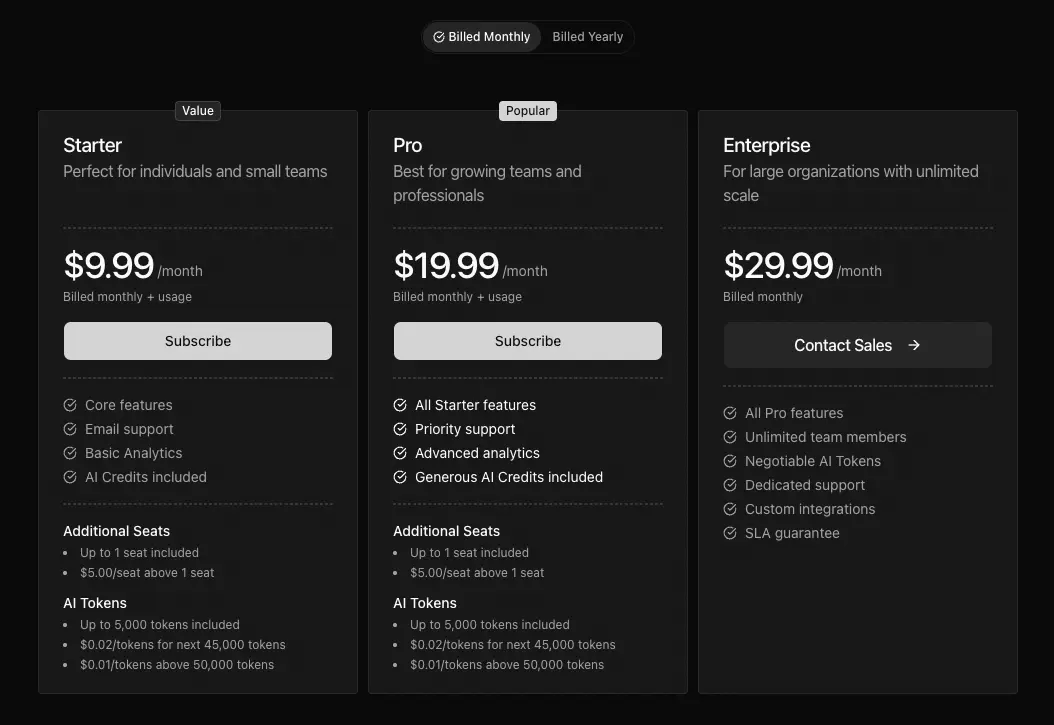
Build subscriptions with multiple price components using advanced pricing: base fees, per-seat charges, and metered usage like AI tokens. Replace planId with lineItems for this flexibility. Stripe supports multi-line checkout natively; Polar requires separate products for each tier.
This page is part of the Billing & Subscriptions documentation. Available since version 1.1.0.
 Click to expand
Choosing Your Pricing Structure
The billing config supports two approaches:
| Approach | Best For | Key Field |
|---|---|---|
| SimplePlan | Single price per plan | planId |
| AdvancedPlan | Multiple prices, complex scenarios | lineItems |
How to Choose
SimplePlan (planId) works when:
- One recurring price per plan
- Straightforward pricing (e.g., $19/month for Pro)
- No usage-based components
AdvancedPlan (lineItems) works when:
- Base fee plus per-seat pricing
- Metered usage components (AI tokens, API calls)
- Tiered pricing on any component
- Optional add-ons at checkout
Multi-Line Item Checkout (Stripe Only)
Multi-line item checkout creates a subscription with multiple prices. Each line item becomes a separate line on the invoice.
Line Item Structure
interface LineItem { id: string; // Unique identifier name: string; // Display name type: 'flat' | 'usage'; // Pricing type priceId?: string; // Stripe price ID productId?: string; // Polar product ID (not for multi-item) unit?: string; // Unit label (e.g., "seat", "token") cost?: number; // Base cost for display tiers?: PricingTier[]; // Tiered pricing quantity?: number; // Initial quantity (default: 1) optional?: boolean; // Customer can toggle adjustableQuantity?: { // Customer can change quantity enabled: boolean; minimum?: number; maximum?: number; }; billingUsageType?: 'licensed' | 'metered';}Line Item Types
| Type | Description | Use Case |
|---|---|---|
flat | Fixed recurring cost | Base subscription fee |
usage | Quantity-based cost | Per-seat, per-unit billing |
Billing Usage Types
The billingUsageType field determines how quantities are handled:
| Type | Quantity | Billing | Use Case |
|---|---|---|---|
licensed | Set at checkout | Pre-determined | Per-seat billing |
metered | Tracked by Stripe | Post-usage | AI tokens, API calls |
Important: Metered prices cannot have adjustableQuantity or be optional - Stripe tracks usage automatically.
Primary Price ID
When using lineItems, set primaryPriceId to identify the plan in webhooks:
{ name: 'pro-monthly', displayName: 'Pro Monthly', interval: 'month', primaryPriceId: process.env.STRIPE_PRICE_PRO_BASE!, lineItems: [ { id: 'base', name: 'Pro Subscription', type: 'flat', priceId: process.env.STRIPE_PRICE_PRO_BASE!, cost: 29, }, // ... additional line items ],}If primaryPriceId is not set, the system uses the first line item with a priceId as the primary. Explicitly setting it avoids order-dependent matching issues.
Tiered Pricing
Tiered pricing charges different rates based on quantity ranges. Common for per-seat or usage-based billing.
Tier Structure
interface PricingTier { cost: number; // Unit price in this tier upTo: number | 'infinite' | undefined; // Upper bound}upTo Values
| Value | Meaning |
|---|---|
number | Up to this quantity (inclusive) |
'infinite' | No upper limit |
undefined | Same as 'infinite' |
Example: Per-Seat Tiered Pricing
{ id: 'seats', name: 'Team Members', type: 'usage', priceId: process.env.STRIPE_PRICE_PRO_SEATS!, unit: 'seat', billingUsageType: 'licensed', tiers: [ { cost: 0, upTo: 1 }, // First seat included { cost: 5, upTo: 10 }, // $5/seat for seats 2-10 { cost: 4, upTo: 50 }, // $4/seat for seats 11-50 { cost: 3, upTo: 'infinite' }, // $3/seat for 51+ ],}Example: AI Token Tiers
{ id: 'ai-tokens', name: 'AI Tokens', type: 'usage', priceId: process.env.STRIPE_PRICE_AI_TOKENS!, unit: 'token', billingUsageType: 'metered', tiers: [ { cost: 0, upTo: 5000 }, // 5K free tokens { cost: 0.02, upTo: 50000 }, // $0.02/token up to 50K { cost: 0.01, upTo: 'infinite' }, // $0.01/token after 50K ],}Optional Line Items (Stripe Only)
Optional line items let customers choose add-ons during checkout. They appear as toggleable options.
Configuration
{ id: 'premium-support', name: 'Premium Support', type: 'flat', priceId: process.env.STRIPE_PRICE_PREMIUM_SUPPORT!, cost: 49, optional: true, // Customer can toggle this}With Adjustable Quantity
{ id: 'extra-seats', name: 'Additional Seats', type: 'usage', priceId: process.env.STRIPE_PRICE_EXTRA_SEATS!, unit: 'seat', cost: 10, optional: true, billingUsageType: 'licensed', adjustableQuantity: { enabled: true, minimum: 1, maximum: 100, },}Restrictions
- Requires
priceId: Optional items must have a price ID for checkout - Cannot be metered: Metered prices are tracked by Stripe, not selected by customer
- Requires base plan: Optional items need a
planIdor baselineItems- they can't be standalone
Display-Only Line Items
Use display-only line items to show pricing details in the UI without including them in checkout. This is useful when:
- Checkout uses a single
planIdbut you want to show component breakdown - You're displaying future or estimated costs
Configuration
Omit priceId and productId to make a line item display-only:
{ id: 'included-seats', name: 'Included Seats', type: 'usage', unit: 'seat', cost: 0, // No priceId - display only}Provider Support Matrix
| Feature | Stripe | Polar |
|---|---|---|
| Multi-line item checkout | Yes | No |
| Tiered pricing | Yes | No |
| Optional add-ons | Yes | No |
| Adjustable quantity | Yes | No |
| Subscription quantity updates | Yes | Yes |
| Metered billing | Yes | Yes |
| Display-only items | Yes | Yes |
Polar users: Configure complex pricing in the Polar dashboard. You can use lineItems in MakerKit to display price breakdowns in your UI, but they're presentational only - checkout uses the productId.
Complete Examples
Base + Seats + Metered Usage
A Pro plan with base fee, per-seat pricing, and metered AI tokens:
packages/billing/config/src/config.ts
{ id: 'pro', name: 'Pro', description: 'For growing teams', currency: 'USD', features: [ 'Unlimited projects', 'Advanced analytics', 'Priority support', ], plans: [ { name: 'pro-monthly', displayName: 'Pro', interval: 'month', cost: 29, primaryPriceId: process.env.STRIPE_PRICE_PRO_BASE!, limits: { projects: null, // Unlimited aiTokens: 100_000, }, lineItems: [ { id: 'base', name: 'Pro Subscription', type: 'flat', priceId: process.env.STRIPE_PRICE_PRO_BASE!, cost: 29, }, { id: 'seats', name: 'Team Members', type: 'usage', priceId: process.env.STRIPE_PRICE_PRO_SEATS!, unit: 'seat', billingUsageType: 'licensed', tiers: [ { cost: 0, upTo: 1 }, // First seat included { cost: 5, upTo: 'infinite' }, ], }, { id: 'ai-tokens', name: 'AI Tokens', type: 'usage', priceId: process.env.STRIPE_PRICE_AI_TOKENS!, unit: 'token', billingUsageType: 'metered', tiers: [ { cost: 0, upTo: 5000 }, { cost: 0.02, upTo: 50000 }, { cost: 0.01, upTo: 'infinite' }, ], }, ], }, ],}Plan with Optional Add-Ons
A plan using planId for the base subscription with optional premium support
packages/billing/config/src/config.ts
{ id: 'starter', name: 'Starter', description: 'Perfect for small teams', currency: 'USD', features: [ 'Up to 5 team members', 'Core features', 'Email support', ], plans: [ { name: 'starter-monthly', displayName: 'Starter', interval: 'month', limits: { seats: 5 }, lineItems: [ { id: 'base', name: 'Starter Subscription', type: 'flat', priceId: process.env.STRIPE_PRICE_STARTER!, cost: 19, }, { id: 'premium-support', name: 'Premium Support', type: 'flat', priceId: process.env.STRIPE_PRICE_PREMIUM_SUPPORT!, cost: 49, optional: true, }, { id: 'extra-storage', name: 'Extra Storage (10GB)', type: 'flat', priceId: process.env.STRIPE_PRICE_EXTRA_STORAGE!, cost: 9, optional: true, }, ], }, ],}Volume Discount Tiered Pricing
Per-seat pricing with volume discounts:
{ id: 'team-seats', name: 'Team Members', type: 'usage', priceId: process.env.STRIPE_PRICE_TEAM_SEATS!, unit: 'seat', billingUsageType: 'licensed', adjustableQuantity: { enabled: true, minimum: 1, maximum: 500, }, tiers: [ { cost: 15, upTo: 5 }, // $15/seat for 1-5 seats { cost: 12, upTo: 25 }, // $12/seat for 6-25 seats { cost: 10, upTo: 100 }, // $10/seat for 26-100 seats { cost: 8, upTo: 'infinite' }, // $8/seat for 101+ seats ],}Setting Up Stripe Prices
For multi-line item checkout, you need to create the corresponding prices in Stripe:
1. Flat Prices
Create as a standard recurring price:
- Pricing model: Flat rate
- Billing period: Monthly or yearly
2. Tiered Prices
Create with tiered pricing:
- Pricing model: Tiered pricing
- Tiers: Match your config tiers exactly
3. Metered Prices
Create with usage-based pricing:
- Pricing model: Usage-based
- Usage type: Metered
- Aggregation: Sum (or as needed)
Limitations
Customer Portal Restrictions (Multi-Line Items)
Subscriptions with multiple products have significant Customer Portal limitations. When a subscription contains multiple line items, customers can only cancel the subscription through the portal. They cannot:
- Switch to a different plan
- Update quantities
- Add or remove line items
- Modify the subscription in any way
This is a Stripe limitation, not a MakerKit restriction. The same restriction applies to subscriptions with usage-based billing.
MakerKit behavior: The billing UI automatically disables plan switching for multi-line item subscriptions since the portal can't handle it. Customers see the cancel option only.
Handling upgrades: Since customers can't self-service plan changes through the portal:
- Immediate invoicing (recommended): Configure Stripe to invoice immediately on subscription changes. When you upgrade a customer via API, they're billed right away instead of waiting for the billing cycle. This makes programmatic upgrades feel instant.
- Build custom upgrade UI: Create upgrade functionality in your app using
billing.updateSubscriptionQuantity()and Stripe's API. Your UI handles what the portal cannot. - Use SimplePlan instead: If self-service upgrades are critical to your product, stick with
planIdrather thanlineItems.
Other Stripe Limitations
Mixing billing intervals is not supported. All line items in a multi-price checkout must share the same interval (all monthly or all yearly). You cannot combine a monthly base fee with a yearly add-on in a single checkout session.
Trialing subscriptions: Customer modifications to a trialing subscription end the trial immediately and create an invoice for payment.
Maximum 10 products for plan switching: When configuring plan switching in the portal, you can specify a maximum of 10 products for customers to choose from.
Polar: Different Approach
Polar handles complex pricing at the product level. Instead of multi-line item checkout, you configure complete products directly in the Polar dashboard with all pricing components, tiers, and add-ons bundled together.
lineItems with Polar is UI-only. You can define lineItems in your billing config to display price breakdowns in your pricing table (base fee, per-seat cost, included features), but the actual checkout uses productId to reference the complete Polar product. The line items don't affect what Polar charges - they're purely for presentation.
Common Pitfalls
- Mixing
planIdwithlineItemsfor checkout: When usinglineItemsfor multi-price checkout, don't includeplanId. Choose one approach. You can useplanIdwith optionallineItems, but notplanIdwith baselineItems. - Missing
primaryPriceId: WithoutprimaryPriceId, webhook handlers use the first line item's price ID for plan matching. This can cause issues if you reorder line items. - Metered prices as optional items: Metered prices cannot be optional because Stripe tracks usage automatically - there's no quantity to select at checkout.
- Tiers not matching Stripe: Your config tiers must match Stripe's tier configuration exactly. Mismatches cause checkout or display issues.
- Forgetting
billingUsageType: For usage line items, always specifylicensed(quantity at checkout) ormetered(Stripe tracks usage). - Expecting
lineItemsto affect Polar checkout: With Polar,lineItemsare UI-only for displaying price breakdowns. Checkout usesproductId- configure actual pricing in the Polar dashboard.
Frequently Asked Questions
Can I combine planId with lineItems?
How do I show tiered pricing in the UI?
What happens if a customer changes quantity mid-subscription?
Can I have different tiers for monthly vs yearly plans?
How do I migrate from SimplePlan to AdvancedPlan?
Next: Providers →