Advanced Pricing
Multi-line item checkout, tiered pricing, and optional add-ons for complex billing scenarios
Advanced pricing in Makerkit lets you create subscriptions with multiple price components: a base fee, per-seat charges, and metered usage like AI tokens. Use lineItems instead of planId when you need this flexibility. Stripe supports multi-line item checkout; Polar requires separate products per tier.
This guide is part of the Billing & Subscriptions documentation. Introduced in version 1.1.0.
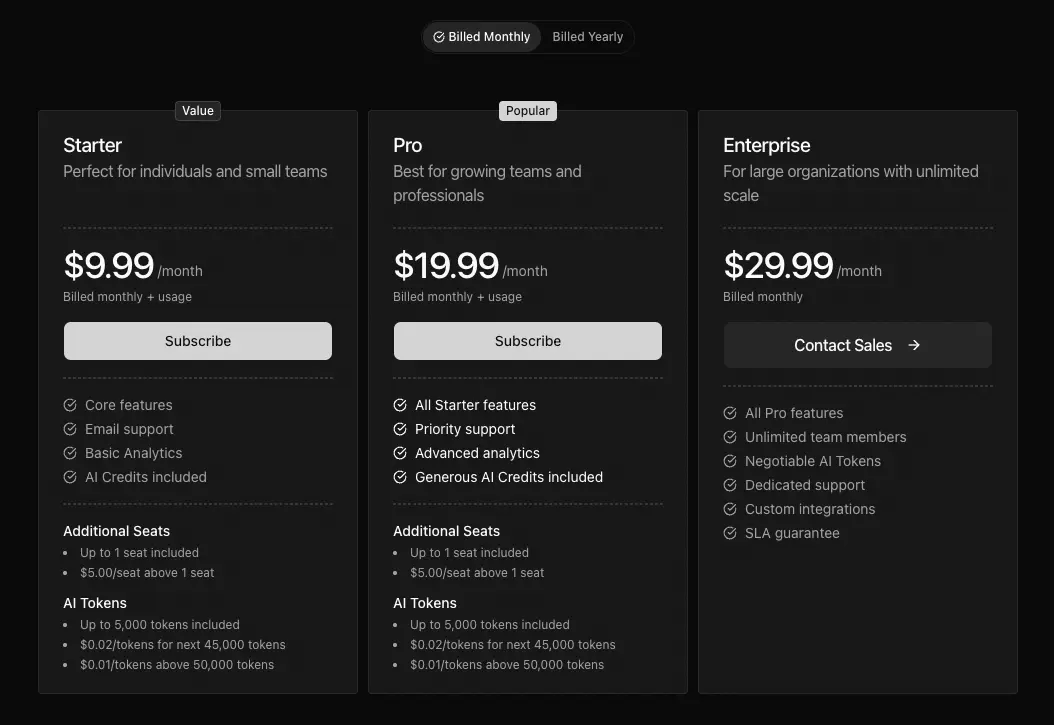 Click to expand
When to Use Advanced Pricing
The billing configuration supports two plan structures:
| Structure | Use Case | Key Field |
|---|---|---|
| SimplePlan | Single price per plan | planId |
| AdvancedPlan | Multiple prices, complex scenarios | lineItems |
Decision Tree
Use SimplePlan (planId) when:
- You have a single recurring price per plan
- Pricing is straightforward (e.g., $19/month for Pro)
- You don't need usage-based components
Use AdvancedPlan (lineItems) when:
- You need base fee + per-seat pricing
- You want to include metered usage (AI tokens, API calls)
- You need tiered pricing for any component
- You want customers to select optional add-ons at checkout
Multi-Line Item Checkout (Stripe Only)
Multi-line item checkout creates a subscription with multiple prices. Each line item becomes a separate line on the invoice.
Line Item Structure
interface LineItem { id: string; // Unique identifier name: string; // Display name type: 'flat' | 'usage'; // Pricing type priceId?: string; // Stripe price ID productId?: string; // Polar product ID (not for multi-item) unit?: string; // Unit label (e.g., "seat", "token") cost?: number; // Base cost for display tiers?: PricingTier[]; // Tiered pricing quantity?: number; // Initial quantity (default: 1) optional?: boolean; // Customer can toggle adjustableQuantity?: { // Customer can change quantity enabled: boolean; minimum?: number; maximum?: number; }; billingUsageType?: 'licensed' | 'metered';}Line Item Types
| Type | Description | Use Case |
|---|---|---|
flat | Fixed recurring cost | Base subscription fee |
usage | Quantity-based cost | Per-seat, per-unit billing |
Billing Usage Types
The billingUsageType field determines how quantities are handled:
| Type | Quantity | Billing | Use Case |
|---|---|---|---|
licensed | Set at checkout | Pre-determined | Per-seat billing |
metered | Tracked by Stripe | Post-usage | AI tokens, API calls |
Important: Metered prices cannot have adjustableQuantity or be optional - Stripe tracks usage automatically.
Primary Price ID
When using lineItems, set primaryPriceId to identify the plan in webhooks:
{ name: 'pro-monthly', displayName: 'Pro Monthly', interval: 'month', primaryPriceId: process.env.STRIPE_PRICE_PRO_BASE!, lineItems: [ { id: 'base', name: 'Pro Subscription', type: 'flat', priceId: process.env.STRIPE_PRICE_PRO_BASE!, cost: 29, }, // ... additional line items ],}If primaryPriceId is not set, the system uses the first line item with a priceId as the primary. Explicitly setting it avoids order-dependent matching issues.
Tiered Pricing
Tiered pricing charges different rates based on quantity ranges. Common for per-seat or usage-based billing.
Tier Structure
interface PricingTier { cost: number; // Unit price in this tier upTo: number | 'infinite' | undefined; // Upper bound}upTo Values
| Value | Meaning |
|---|---|
number | Up to this quantity (inclusive) |
'infinite' | No upper limit |
undefined | Same as 'infinite' |
Example: Per-Seat Tiered Pricing
{ id: 'seats', name: 'Team Members', type: 'usage', priceId: process.env.STRIPE_PRICE_PRO_SEATS!, unit: 'seat', billingUsageType: 'licensed', tiers: [ { cost: 0, upTo: 1 }, // First seat included { cost: 5, upTo: 10 }, // $5/seat for seats 2-10 { cost: 4, upTo: 50 }, // $4/seat for seats 11-50 { cost: 3, upTo: 'infinite' }, // $3/seat for 51+ ],}Example: AI Token Tiers
{ id: 'ai-tokens', name: 'AI Tokens', type: 'usage', priceId: process.env.STRIPE_PRICE_AI_TOKENS!, unit: 'token', billingUsageType: 'metered', tiers: [ { cost: 0, upTo: 5000 }, // 5K free tokens { cost: 0.02, upTo: 50000 }, // $0.02/token up to 50K { cost: 0.01, upTo: 'infinite' }, // $0.01/token after 50K ],}Optional Line Items (Stripe Only)
Optional line items let customers choose add-ons during checkout. They appear as toggleable options.
Configuration
{ id: 'premium-support', name: 'Premium Support', type: 'flat', priceId: process.env.STRIPE_PRICE_PREMIUM_SUPPORT!, cost: 49, optional: true, // Customer can toggle this}With Adjustable Quantity
{ id: 'extra-seats', name: 'Additional Seats', type: 'usage', priceId: process.env.STRIPE_PRICE_EXTRA_SEATS!, unit: 'seat', cost: 10, optional: true, billingUsageType: 'licensed', adjustableQuantity: { enabled: true, minimum: 1, maximum: 100, },}Restrictions
- Requires
priceId: Optional items must have a price ID for checkout - Cannot be metered: Metered prices are tracked by Stripe, not selected by customer
- Requires base plan: Optional items need a
planIdor baselineItems- they can't be standalone
Display-Only Line Items
Use display-only line items to show pricing details in the UI without including them in checkout. This is useful when:
- Checkout uses a single
planIdbut you want to show component breakdown - You're displaying future or estimated costs
Configuration
Omit priceId and productId to make a line item display-only:
{ id: 'included-seats', name: 'Included Seats', type: 'usage', unit: 'seat', cost: 0, // No priceId - display only}Provider Support Matrix
| Feature | Stripe | Polar |
|---|---|---|
| Multi-line item checkout | Yes | No |
| Tiered pricing | Yes | No |
| Optional add-ons | Yes | No |
| Adjustable quantity | Yes | No |
| Subscription quantity updates | Yes | Yes |
| Metered billing | Yes | Yes |
| Display-only items | Yes | Yes |
Polar users: Build complex pricing in the Polar dashboard. lineItems in MakerKit are for UI display only (showing price breakdowns) - actual checkout uses the productId.
Complete Examples
Base + Seats + Metered Usage
A Pro plan with base fee, per-seat pricing, and metered AI tokens:
packages/billing/config/src/config.ts
{ id: 'pro', name: 'Pro', description: 'For growing teams', currency: 'USD', features: [ 'Unlimited projects', 'Advanced analytics', 'Priority support', ], plans: [ { name: 'pro-monthly', displayName: 'Pro', interval: 'month', cost: 29, primaryPriceId: process.env.STRIPE_PRICE_PRO_BASE!, limits: { projects: null, // Unlimited aiTokens: 100_000, }, lineItems: [ { id: 'base', name: 'Pro Subscription', type: 'flat', priceId: process.env.STRIPE_PRICE_PRO_BASE!, cost: 29, }, { id: 'seats', name: 'Team Members', type: 'usage', priceId: process.env.STRIPE_PRICE_PRO_SEATS!, unit: 'seat', billingUsageType: 'licensed', tiers: [ { cost: 0, upTo: 1 }, // First seat included { cost: 5, upTo: 'infinite' }, ], }, { id: 'ai-tokens', name: 'AI Tokens', type: 'usage', priceId: process.env.STRIPE_PRICE_AI_TOKENS!, unit: 'token', billingUsageType: 'metered', tiers: [ { cost: 0, upTo: 5000 }, { cost: 0.02, upTo: 50000 }, { cost: 0.01, upTo: 'infinite' }, ], }, ], }, ],}Plan with Optional Add-Ons
A plan using planId for the base subscription with optional premium support
packages/billing/config/src/config.ts
{ id: 'starter', name: 'Starter', description: 'Perfect for small teams', currency: 'USD', features: [ 'Up to 5 team members', 'Core features', 'Email support', ], plans: [ { name: 'starter-monthly', displayName: 'Starter', interval: 'month', limits: { seats: 5 }, lineItems: [ { id: 'base', name: 'Starter Subscription', type: 'flat', priceId: process.env.STRIPE_PRICE_STARTER!, cost: 19, }, { id: 'premium-support', name: 'Premium Support', type: 'flat', priceId: process.env.STRIPE_PRICE_PREMIUM_SUPPORT!, cost: 49, optional: true, }, { id: 'extra-storage', name: 'Extra Storage (10GB)', type: 'flat', priceId: process.env.STRIPE_PRICE_EXTRA_STORAGE!, cost: 9, optional: true, }, ], }, ],}Volume Discount Tiered Pricing
Per-seat pricing with volume discounts:
{ id: 'team-seats', name: 'Team Members', type: 'usage', priceId: process.env.STRIPE_PRICE_TEAM_SEATS!, unit: 'seat', billingUsageType: 'licensed', adjustableQuantity: { enabled: true, minimum: 1, maximum: 500, }, tiers: [ { cost: 15, upTo: 5 }, // $15/seat for 1-5 seats { cost: 12, upTo: 25 }, // $12/seat for 6-25 seats { cost: 10, upTo: 100 }, // $10/seat for 26-100 seats { cost: 8, upTo: 'infinite' }, // $8/seat for 101+ seats ],}Setting Up Stripe Prices
For multi-line item checkout, you need to create the corresponding prices in Stripe:
1. Flat Prices
Create as a standard recurring price:
- Pricing model: Flat rate
- Billing period: Monthly or yearly
2. Tiered Prices
Create with tiered pricing:
- Pricing model: Tiered pricing
- Tiers: Match your config tiers exactly
3. Metered Prices
Create with usage-based pricing:
- Pricing model: Usage-based
- Usage type: Metered
- Aggregation: Sum (or as needed)
Limitations
Stripe Customer Portal and Multi-Line Subscriptions
When a subscription has multiple line items, the Stripe Customer Portal becomes limited. Customers with multi-product subscriptions can only cancel through the portal. They lose the ability to:
- Change plans
- Adjust quantities
- Add or remove products
- Make any subscription modifications
This is a documented Stripe limitation. Usage-based billing subscriptions face the same constraint.
What MakerKit does: The billing UI detects multi-line subscriptions and hides plan switching options automatically. Only cancellation remains available through the portal.
Upgrade strategies for multi-line subscriptions:
- Immediate invoicing (recommended): Configure Stripe to bill immediately on subscription changes. Programmatic upgrades via API feel instant to customers rather than waiting for the billing cycle.
- Custom upgrade flow: Build upgrade functionality into your app using
billing.updateSubscriptionQuantity()and Stripe's API directly. Your UI handles what the portal cannot. - SimplePlan for self-service: When customer-driven plan changes are a priority, use
planIdoverlineItems.
Other Stripe Constraints
No mixed billing intervals: Every line item in a multi-price checkout must use the same interval. Mixing monthly base fees with yearly add-ons in one checkout session is not possible.
Trial behavior: Modifying a subscription that's still in trial ends the trial immediately and bills the customer.
Plan switching limits: The portal supports a maximum of 10 products in plan switching configurations.
Polar: A Different Model
Polar takes a different approach to complex pricing. Rather than assembling line items at checkout, you build complete products with all pricing components directly in the Polar dashboard.
lineItems with Polar is for display only. You can add lineItems to your billing config to show price breakdowns in your pricing table UI (base cost, per-seat pricing, what's included), but checkout uses productId to reference the Polar product. The line items are purely presentational - Polar bills based on how you configured the product in their dashboard.
Common Pitfalls
- Mixing
planIdwithlineItemsfor checkout: When usinglineItemsfor multi-price checkout, don't includeplanId. Choose one approach. You can useplanIdwith optionallineItems, but notplanIdwith baselineItems. - Missing
primaryPriceId: WithoutprimaryPriceId, webhook handlers use the first line item's price ID for plan matching. This can cause issues if you reorder line items. - Metered prices as optional items: Metered prices cannot be optional because Stripe tracks usage automatically - there's no quantity to select at checkout.
- Tiers not matching Stripe: Your config tiers must match Stripe's tier configuration exactly. Mismatches cause checkout or display issues.
- Forgetting
billingUsageType: For usage line items, always specifylicensed(quantity at checkout) ormetered(Stripe tracks usage). - Thinking
lineItemsaffects Polar billing: With Polar,lineItemsonly control what's displayed in your pricing UI. Actual checkout usesproductId- set up pricing in the Polar dashboard.
Frequently Asked Questions
Can I combine planId with lineItems?
How do I show tiered pricing in the UI?
What happens if a customer changes quantity mid-subscription?
Can I have different tiers for monthly vs yearly plans?
How do I migrate from SimplePlan to AdvancedPlan?
Next: Providers →