MakerKit 1.1.0 ships with multi-line item checkout, tiered pricing, optional add-ons, and a recipe to enable automatic per-seat billing.
You can now combine a base subscription fee, per-seat charges, and metered AI tokens in a single Stripe checkout session.
 Click to expand
Billing is the feature that makes or breaks a SaaS product. Get it wrong and you leave money on the table. Get it right and your pricing becomes a competitive advantage.
With 1.1.0, we're giving you the tools to do the latter (and we're not done yet...).
What's New in 1.1.0
Multi-line item checkout creates subscriptions with multiple price components. Instead of a single planId, you define lineItems that combine in one checkout:
lineItems: [ { id: 'base', name: 'Pro Subscription', type: 'flat', priceId: 'price_pro_base', cost: 29, }, { id: 'seats', name: 'Team Members', type: 'usage', unit: 'seat', priceId: 'price_pro_seats', tiers: [ { cost: 0, upTo: 1 }, // First seat included { cost: 5, upTo: 'infinite' }, ], }, { id: 'ai-tokens', name: 'AI Tokens', type: 'usage', billingUsageType: 'metered', unit: 'tokens', priceId: 'price_ai_tokens', tiers: [ { cost: 0, upTo: 5000 }, { cost: 0.02, upTo: 50000 }, { cost: 0.01, upTo: 'infinite' }, ], },]This configuration does what typically takes months of custom Stripe integration: a base fee, tiered per-seat pricing with the first seat free, and metered AI token billing with volume discounts.
 Click to expand
- Tiered pricing gives you volume discounts. The
tiersarray lets you define graduated pricing where the cost per unit decreases as quantity increases. Stripe handles all the proration math when customers upgrade mid-cycle. - Optional add-ons let customers choose premium features during checkout. Mark a line item as
optional: trueand it appears as a toggleable option:
{ id: 'premium-support', name: 'Premium Support', type: 'flat', priceId: 'price_premium_support', cost: 49, optional: true,}Dynamic per-seat billing updates subscription quantities automatically when team members join or leave. We built this using organization lifecycle hooks that fire after membership changes:
// When a member joins, update the subscriptionafterInvitationAcceptRegistry.registerPolicy(seatBillingOnAcceptPolicy);// When a member leaves, update the subscriptionafterMemberRemoveRegistry.registerPolicy(seatBillingOnRemovePolicy);The billing provider handles proration automatically. Add a member mid-cycle? Stripe charges a prorated amount. Remove one? Prorated credit.
 Click to expand
 Click to expand
Why This Matters
The SaaS pricing landscape has changed. Flat-rate plans are leaving money on the table. The companies winning in 2026 use hybrid pricing models: a base fee for core access, per-seat charges that scale with team size, and usage-based components for variable costs like AI or API calls.
Implementing this in Stripe requires custom code. A lot of it. Multi-line item checkout, subscription quantity updates, webhook handling for seat changes, proration logic. We've seen teams spend months on billing alone.
MakerKit 1.1.0 makes it possible to configure this in a few minutes.
How It Works
SimplePlan vs AdvancedPlan
MakerKit's billing configuration supports two plan structures:
SimplePlan uses a single planId for straightforward pricing:
{ name: 'starter-monthly', planId: 'price_starter_monthly', displayName: 'Starter', interval: 'month', cost: 19,}AdvancedPlan uses lineItems for complex scenarios:
{ name: 'pro-monthly', displayName: 'Pro', interval: 'month', cost: 29, lineItems: [ // Multiple prices combined ],}Both work. Choose SimplePlan when you have one price per plan. Choose AdvancedPlan when you need multiple components.
Provider Support
| Capability | Stripe | Polar |
|---|---|---|
| Multi-line item checkout | Yes | No |
| Tiered pricing | Yes | No |
| Optional add-ons | Yes | No |
| Subscription quantity updates | Yes | Yes |
| Metered billing | Yes | Yes |
Multi-line item checkout is Stripe-only. Polar's checkout model supports a single product per session. If you need complex pricing, use Stripe.
Real Example: Complete Pro Plan
Here's a production-ready configuration that combines everything:
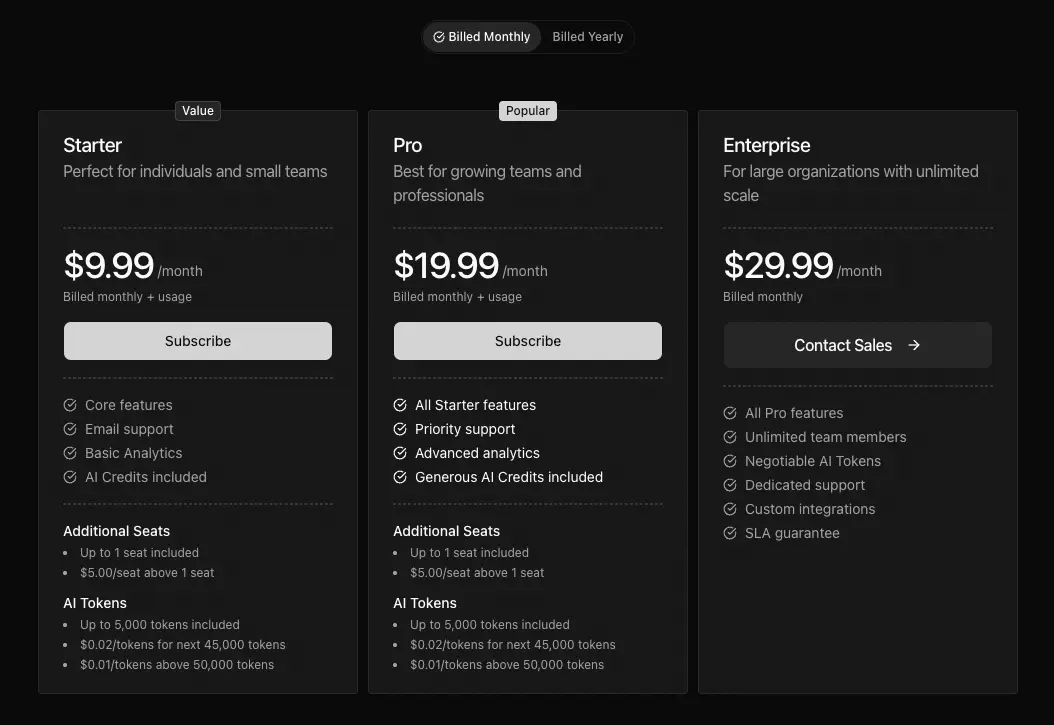
{ id: 'pro', name: 'Pro', description: 'For growing teams', currency: 'USD', features: [ 'Unlimited projects', 'Advanced analytics', 'Priority support', 'Generous AI credits included', ], plans: [ { name: 'pro-monthly', displayName: 'Pro Monthly', interval: 'month', cost: 19.99, lineItems: [ { id: 'pro-base', name: 'Pro Subscription', type: 'flat', priceId: process.env.STRIPE_PRICE_PRO_BASE!, }, { id: 'pro-per-seat', name: 'Additional Seats', type: 'usage', unit: 'seat', priceId: process.env.STRIPE_PRICE_PRO_SEATS!, tiers: [ { cost: 0, upTo: 1 }, { cost: 5, upTo: 'infinite' }, ], }, { id: 'pro-ai-tokens', name: 'AI Tokens', type: 'usage', billingUsageType: 'metered', unit: 'tokens', priceId: process.env.STRIPE_PRICE_AI_TOKENS!, tiers: [ { cost: 0, upTo: 5000 }, { cost: 0.02, upTo: 50000 }, { cost: 0.01, upTo: 'infinite' }, ], }, ], }, ],}This creates a plan with:
- $19.99/month base fee
- First seat included, $5/seat after that
- 5,000 free AI tokens, then $0.02/token up to 50K, then $0.01/token
The pricing table component renders this automatically. The checkout creates a Stripe session with all three prices. The webhooks track everything.
Recording Metered Usage
Metered line items (like AI tokens) require you to report usage via Stripe Billing Meters. MakerKit provides a unified API for this:
import { getBilling } from '@kit/billing-api';// Record usage when customer consumes tokensconst billing = await getBilling(auth);await billing.recordMeterEvent({ eventName: 'ai_tokens_used', // Must match your Stripe meter customerId: stripeCustomerId, value: tokensConsumed,});Stripe aggregates the usage and bills at the end of each billing period using your tiered pricing. You can also query current usage:
const usage = await billing.getUsage( meterId, stripeCustomerId, startOfBillingPeriod, now);See the Metered Usage documentation for the complete setup including Stripe meter configuration.
Current Limitations
Stripe Checkout doesn't support mixing intervals. All line items in a multi-price checkout must share the same billing interval (all monthly or all yearly). You can't combine a monthly base fee with a yearly add-on in a single checkout session. We're hoping Stripe adds this capability soon.
Coming Soon: Credit Drawdown
We're working on prepaid credits billing for the next release. Buy a block of credits upfront (say, 10,000 AI tokens for $50) and draw them down as you use them. This pattern is huge for AI-powered SaaS where usage is unpredictable.
Stripe recently launched billing credits for exactly this use case. We're building the MakerKit integration now.
Quick Recommendation
MakerKit 1.1.0 advanced billing is best for:
- SaaS products with hybrid pricing (base + seats + usage)
- Teams that need volume discounts or tiered pricing
- Products with optional premium features or add-ons
- Anyone tired of building custom Stripe integrations
Skip advanced billing if:
- You have a single flat-rate price per plan (use SimplePlan instead)
- You're using Polar or Lemon Squeezy (multi-line items are Stripe-only)
Our pick: If you're building a serious SaaS in 2026, you need flexible billing. MakerKit 1.1.0 has the most complete implementation of any starter kit. Start with the Advanced Pricing documentation to see the full configuration options.
Upgrade Notes
These features are additive. Your existing billing configuration continues to work unchanged.
To use advanced pricing:
- Replace
planIdwithlineItemsin plans that need multiple prices - Create the corresponding prices in Stripe (tiered, metered, etc.)
- Set environment variables for each price ID
- Update your pricing table if you want to show tier breakdowns
Getting Started
New to MakerKit? Check out the Next.js Drizzle SaaS Starter Kit or Next.js Prisma SaaS Starter Kit.
Existing user? Read the full documentation:
- Advanced Pricing for multi-line items, tiered pricing, and add-ons
- Per-Seat Billing for automatic subscription quantity updates
- Organization Lifecycle Hooks for the hook system powering per-seat billing
Frequently Asked Questions
Does multi-line item checkout work with Polar?
Can I migrate from planId to lineItems?
How do I show tiered pricing in my pricing table?
When will credits-based billing be available?
Next: Explore the Advanced Pricing documentation for the complete configuration reference.