The best vibe coding tools for SaaS in 2026 are Claude Code and Cursor for production work on a MakerKit codebase, Codex for debugging and code review, and Lovable or Bolt.new for validating an idea before you write real code.
The tool is only half the decision. The other half is the codebase the agent works in, and that is where most vibe-coded SaaS products fail.
Quick answer:
- Best for production SaaS: Claude Code (multi-file features) + Cursor (daily editing), running on a MakerKit codebase
- Best for debugging and review: Codex by OpenAI
- Best for idea validation: Lovable or Bolt.new, then rebuild on a production foundation
- What breaks: auth edge cases, multi-tenant data isolation, billing webhooks, and performance at scale
I build and maintain MakerKit, a set of SaaS starter kits for Next.js, TanStack Start, and React Router. Every tool below has written code in our kits or on makerkit.dev itself, which we maintain with Claude Code and Cursor. Disclosure: MakerKit is a paid product, and this post recommends it as the foundation layer.
Updated October 2026: Windsurf is now Devin Desktop, v0 builds full-stack apps with Git, and the MakerKit section covers the agent rules and MCP server that ship with the kits. Originally published January 2026.
| Tool | Category | Best For | Code Control | Production Ready | Uses MakerKit agent rules |
|---|---|---|---|---|---|
| Claude Code | Coding agent | Multi-file features, refactors | Full | Yes | Yes (CLAUDE.md, skills, MCP) |
| Cursor | AI IDE | Daily production development | Full | Yes | Yes (AGENTS.md, MCP) |
| Codex (OpenAI) | Coding agent | Debugging and code review | Full | Yes | Yes (AGENTS.md, MCP) |
| Google Antigravity | Agentic IDE | Parallel agent workflows | Full | Yes | Yes (AGENTS.md) |
| Devin Desktop (ex-Windsurf) | Agentic IDE | Managing local and cloud agents | Full | Yes | Yes (AGENTS.md) |
| v0 by Vercel | App builder | UI and Next.js frontends | Git export | Partial | No |
| Lovable | App builder | MVPs and idea validation | GitHub sync | No | No |
| Bolt.new | App builder | Throwaway prototypes | Minimal | No | No |
| Replit Agent | App builder | Hosted full-stack prototypes | Some | No | No |
The Four Layers of Vibe Coding
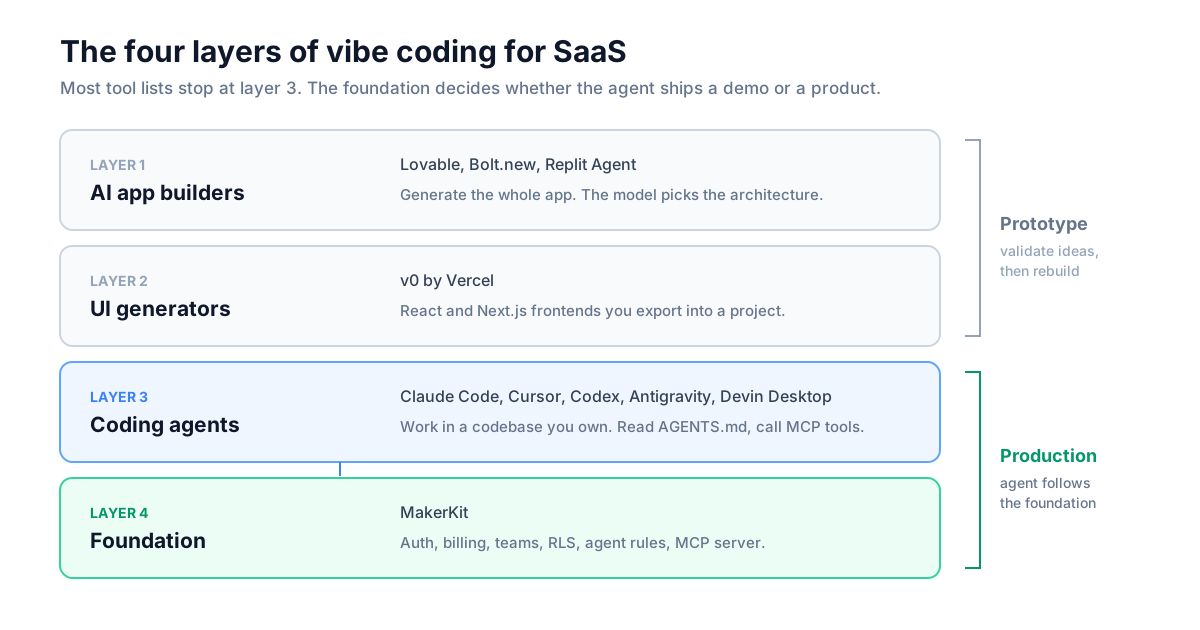
Vibe coding is building software by describing what you want in natural language and letting AI write the code. For SaaS it has four layers, and most "best tools" lists only cover the first three:
- AI app builders (Lovable, Bolt.new, Replit Agent) generate a complete application from a description. Fastest to a demo, weakest at custom business logic, and you inherit whatever architecture the model chose that day.
- UI generators (v0 by Vercel) produce React and Next.js components you can export. v0 now also builds full-stack apps with Git branches and pull requests, but its strength is still the frontend.
- Coding agents and AI IDEs (Claude Code, Cursor, Codex, Antigravity, Devin Desktop) work inside a codebase you own. Full control and production-ready output, but you need to read code.
- The foundation is the codebase the agent works on. A coding agent on an empty repository invents auth, billing, and permissions from scratch. The same agent on a structured SaaS codebase with documented conventions extends patterns that already work.
 Click to expand
The common mistake is choosing by speed to first demo instead of speed to production. Lovable produces a landing page in five minutes. Getting that app to handle real users, team permissions, and failed payments takes weeks of fighting the generated code.
Best Vibe Coding Tools for Production SaaS
These tools require coding knowledge and give you full control of the output. All of them read AGENTS.md-style instruction files and connect to MCP servers, so they get better as your codebase gets more explicit.
Claude Code
Claude Code is Anthropic's coding agent, available in the terminal, VS Code and JetBrains extensions, the desktop app, and on the web. It reads your files, runs commands, and iterates until the build passes. It is the best tool for features that span database, API, and UI layers, because it runs your type checker, reads the errors, and fixes them without you copying output back and forth.
Claude Code also has the deepest customization of any agent: CLAUDE.md instruction files, skills for repeatable workflows, subagents, hooks, and routines that run on a schedule in the cloud. Limitations: it needs a paid Claude plan or API key, heavy sessions burn through usage limits, and the terminal workflow takes a day to get used to. See our Claude Code best practices guide for the setup we use.
Cursor
Cursor is a VS Code fork with AI in every editing action. Tab completion predicts your next edit, Agent mode handles multi-file changes, and cloud agents run tasks in parallel on remote machines. It is the best tool for day-to-day development, when you want to see every diff before it lands. Pro costs $20/month, with Pro+ and Ultra tiers for heavy agent use. Limitations: usage-based credits on top of the subscription make monthly costs harder to predict, and it can still invent API signatures for libraries released after its model's training data. Our Cursor guide for SaaS development walks through building a feature on MakerKit.
Codex by OpenAI
Codex is OpenAI's coding agent, available as an open-source CLI, IDE extension, desktop app, and cloud agent. It launched later than Claude Code and is generally slower and harder to steer. In my experience it is also the most reliable agent for debugging and code review: it is methodical, it reads more of the codebase before acting, and its review comments find real bugs instead of style nits. The /goal feature keeps it working across turns until a stated goal is met, which suits long debugging sessions.
Google Antigravity
Google Antigravity is Google's agentic IDE, announced in November 2025 alongside Gemini 3 and built by the team Google hired from Windsurf. Its Manager View dispatches several agents to different tasks at once: five independent bugs, five agents. Antigravity is free with weekly rate limits, and higher limits come with a Google AI Pro or Ultra subscription. It is a strong pick for teams with a backlog of independent tasks and those already on Google Cloud.
Devin Desktop (formerly Windsurf)
Devin Desktop is the editor previously called Windsurf, renamed by Cognition in June 2026. The Cascade agent was replaced by Devin Local, and the editor now centers on managing local and cloud agents from one place. Existing Windsurf plans, settings, and extensions carried over. Our Windsurf and MakerKit guide still applies to the editor workflow.
Best AI App Builders for Prototypes
App builders get you to a working demo in hours. Use them to validate an idea, build an internal tool, or show investors something clickable. Do not ship them as your SaaS product.
Lovable
Lovable generates full-stack apps from natural language, with a Supabase backend and GitHub sync. It is the best option for non-developers testing a concept. Pro starts at $25/month for 100 credits, with unused credits rolling over for a limited time, and you buy a larger monthly credit tier when you run out. Every prompt spends credits. The limit shows up with complex permissions and custom auth flows, where you spend more prompts, and more credits, fighting the generated code than building. We compared the two directly in MakerKit vs Lovable.
Bolt.new
Bolt.new by StackBlitz runs AI-generated apps in a browser environment and shows you more of the code than Lovable. It is good for answering "what would this look like?" in an afternoon. Like Lovable, it bills by usage: Pro is $25/month for 10M tokens, with unused tokens rolling over. Every prompt sends your project context to the model, so token use per prompt grows with the app, and long debugging sessions on a large codebase use up a plan quickly. It is not where you build a business.
v0 by Vercel
v0 by Vercel generates React and Next.js code with shadcn/ui and Tailwind CSS, and since its 2026 rebuild it works with Git branches, pull requests, and sandboxed previews. It produces the cleanest frontend code of any app builder. The backend is still thin compared to a real SaaS codebase: generate the UI in v0, then bring it into your project.
Replit Agent
Replit Agent builds and hosts full-stack apps inside Replit's cloud environment. It handles more technical work than Lovable, but the hosted IDE workflow does not suit every team, and it hits the same walls on multi-tenant architecture.
Why the Codebase Matters More Than the Tool
The codebase decides whether a coding agent ships production code. Claude Code, Cursor, and Codex all learn from what is already in the repository. Give them consistent patterns and they extend those patterns. Give them an empty folder and they make a new architectural decision on every prompt.
This is the problem MakerKit solves. MakerKit kits ship with:
- Hierarchical agent instructions. A root
AGENTS.mdandCLAUDE.mddescribe the stack, commands, and multi-tenant model, and each package has its ownAGENTS.mdfor its area (database, UI, auth, server actions). An agent working in the database package reads the RLS and migration rules for that package. See the AI agent setup docs. - Pre-configured rules for every major agent: Claude Code, Cursor, Codex, Google Antigravity, Devin Desktop, and Gemini.
- An MCP server that gives agents tools for working with the codebase. The Next.js and TanStack Start kits register it in a shipped
.mcp.json, so Claude Code detects it automatically. It includes PRD tools for planning vibe coding work as PRDs, so the agent builds one story at a time. - Skills for repeatable work, such as writing server actions, building forms with validation, writing Playwright tests, and reviewing database code.
- Guardrails enforced below the AI. Postgres Row Level Security on the Supabase kits means an agent-written query cannot read another team's data even when the agent forgets the
whereclause. Typed server actions with Zod validation reject bad input before it reaches your code. - Verification commands the agent can run:
pnpm typecheck,pnpm lint:fix, and Playwright E2E tests, so the agent checks its own work.
The Turborepo monorepo helps agents too. Each package is small enough to fit in an agent's context with its own instruction file, and Turborepo caches typechecks and builds, so the agent's verification loop stays fast as the app grows. We run the same setup on makerkit.dev: this site has an AGENTS.md at the root and in each app, and we make changes to it with Claude Code.
The AI SaaS starter page covers what the agent tooling includes in each kit.
Best SaaS Tech Stack for Vibe Coding
The stack we ship and recommend for AI-assisted SaaS development:
- AI layer: Claude Code + Cursor. Claude Code for multi-file features and refactors, Cursor for daily editing. Add Codex for code review.
- Foundation: MakerKit. Auth, billing, team accounts, roles and permissions, a super admin panel, and the agent rules above.
- Framework: Next.js 16 or TanStack Start. MakerKit ships both, plus React Router.
- Database: Supabase, Drizzle, or Prisma. Supabase gives you Postgres with RLS enforced in the database. Drizzle gives you TypeScript schemas the agent reads before writing queries. Our Drizzle vs Prisma comparison explains why we default to Drizzle on the non-Supabase kits.
- Auth: Better Auth or Supabase Auth. Better Auth on the Drizzle and Prisma kits, Supabase Auth on the Supabase kits. See Better Auth vs Clerk.
- Billing: Stripe, with Lemon Squeezy, Paddle, or Polar depending on the kit.
- Deployment: Vercel, or Cloudflare, Docker, or a VPS when you want your own infrastructure.
Everything is TypeScript with explicit types, which is what makes it work well with agents: the schema, the action inputs, and the component props all tell the agent what is valid. The full reasoning is in the 2026 SaaS stack.
Claude Code vs Cursor
Claude Code and Cursor complement each other. Most productive developers use both.
Use Cursor when:
- You are making frequent small changes
- You want inline suggestions while typing
- You want to review a visual diff before accepting
- The change is in one or two files
Use Claude Code when:
- A feature spans database, API, and UI layers
- You want the agent to run builds and fix its own errors
- You are refactoring or migrating a large part of the codebase
- You want the work to run unattended, including on a schedule
In MakerKit development we use Cursor for small edits and Claude Code for anything that touches more than one package.
Codex vs Claude Code vs Antigravity
Claude Code is faster and easier to steer. Codex is slower and more thorough. Use Claude Code to build features and Codex to review them. Running Codex as a second reviewer on a Claude Code pull request catches bugs that the agent that wrote the code tends to miss, because the two models make different mistakes.
Choose Codex if:
- You use AI mostly for debugging and code review
- You want long-running agent sessions that stay on task
- You already pay for ChatGPT
Choose Antigravity if:
- You want several agents working on independent tasks at once
- Your team is on Google Cloud and Gemini
What Breaks in Production
These are the failures we see when someone ships an app built with an AI app builder:
- Authentication edge cases. Generated auth handles login and signup. It misses session expiry during long forms, OAuth state validation, magic link race conditions, and MFA flows. Real users hit these in the first week.
- Multi-tenancy. An app builder can generate "users have accounts." It does not generate team isolation, role-based permissions, or the RLS policies that stop one customer from reading another customer's data. Adding this later is a rewrite.
- Billing webhooks. Stripe looks easy until you handle failed payments, downgrades, proration, cancellation grace periods, and seat changes. Generated code covers the happy path.
- Performance at scale. N+1 queries, missing indexes, and unnecessary re-renders work fine with 10 users and fail at 1,000.
- Cost as you iterate. App builders charge per prompt through credits or tokens. A prototype takes a few dozen prompts. Hardening it for paying customers takes hundreds, because every bug fix, permission change, and billing edge case is another metered request. A coding agent on MakerKit costs a one-time license plus the Claude Code or Cursor plan you already pay for, with no per-edit metering from the platform. We break down the numbers in MakerKit vs Lovable.
None of this is a failure of the tools. App builders produce prototypes, which is what they promise. The problem is shipping a prototype as a product. Coding agents have the same weaknesses when they start from an empty repository, which is why the foundation matters.
From Validation to Production
The workflow that works:
- Stage 1: Validate with Lovable or Bolt.new. Build the demo in a day, show it to potential customers, and drop ideas that get no response.
- Stage 2: Build on a foundation with Claude Code and Cursor. Start from MakerKit, so auth, billing, and teams already work, and use the agents to build the features specific to your product. Our guide to building a SaaS quickly covers the order of work.
- Stage 3: Scale with agents. Claude Code for refactors as the codebase grows, Codex for review, Cursor or Antigravity for daily features. The agents write the implementation; you own the architecture.
- Stage 4: Harden before you grow. Security audits, load testing, and compliance work still need human expertise. Many agencies build client projects on MakerKit; contact us and we can connect you with one.
Quick Recommendation
Best vibe coding tools for SaaS:
- Validating an idea? Lovable. Validate or drop it in a day.
- Building a real product? Claude Code + Cursor on MakerKit.
- Reviewing and debugging? Codex.
- Many independent tasks? Google Antigravity or Cursor cloud agents.
- Personal projects and internal tools? Lovable or Bolt.new are fine when bugs are acceptable.
Skip AI app builders if:
- You need custom auth or permissions
- Multi-tenancy is a requirement
- Customers will pay you
Our pick: Claude Code and Cursor on MakerKit. The agents write code fast, and MakerKit gives them working auth, billing, multi-tenancy, and agent rules to follow, so what they write holds up in production.
Frequently Asked Questions
What are the best vibe coding tools in 2026?
Can you build a production SaaS with vibe coding?
Is MakerKit a vibe coding tool?
Which AI coding tools work with MakerKit?
Lovable vs Cursor: which should I use?
Claude Code vs Cursor: which is better?
What happened to Windsurf?
What is vibe coding?
Next Steps
- Have an idea to validate? Build a proof of concept in Lovable, then read MakerKit vs Lovable for when to switch.
- Ready to build for real? Start with MakerKit and set up the agent rules for your tool.
- Learning AI coding? The Cursor tutorial builds a complete feature step by step.
- Want agents running unattended? Set up Claude Code routines for triage and audits on a schedule.
Vibe coding tools will keep changing every few months. The codebase underneath them is the decision that lasts, and an agent working on MakerKit ships a production SaaS where the same agent on an empty repository ships a demo.